Delphinus banner-element
The Delphinus banner element is designed to fit into most column sizes. The element scales itself according to the column width it is to be included in, and is designed based on the design principles from AU IT's design system, Delphinus.

How to create a Delphinus banner
How to create a Delphinus banner
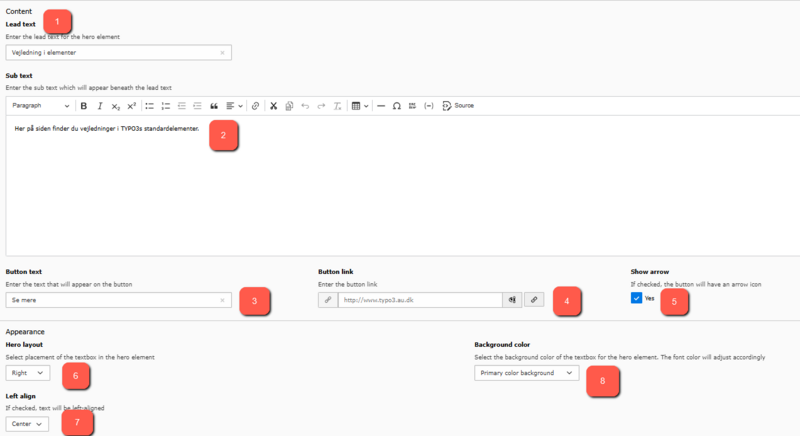
You will find the banner under the "Container" section when you create a new element in TYPO3. To use the banner, you first need to upload the image that you want to use in your element. Then you can choose between eight overall settings in the element, which determine where the image is placed in relation to the text and button.
- The title of your banner is entered here.
- The subtext is filled in in the regular TYPO3 editor.
- Button text is filled in this field.
- Here you fill in the URL that the button should link to.
- The field makes it possible to select an arrow that is an extension of the button text. Tick checkbox if desired.
- Here you can choose where the text should be placed in the banner; right, left, top or bottom.
- Here you can choose which centering the text should have; left or centered.
- The banner background color is selected here where the options are: primary (dark blue) or secondary (white) background color.